You can use subdomains to create unique, separate content areas of your website. For example, blog.yourdomain.com and shop.yourdomain.com.
Subdomains are created using the Subdomains tool in cPanel.
cPanel
You can use subdomains to create unique, separate content areas of your website. For example, blog.yourdomain.com and shop.yourdomain.com. Subdomains are created using the Subdomains tool in cPanel. Click on Subdomains under Domain in cPanel. 2.Under Create a Subdomain, enter…
You can use subdomains to create unique, separate content areas of your website. For example, blog.yourdomain.com and shop.yourdomain.com.
Subdomains are created using the Subdomains tool in cPanel.

2.Under Create a Subdomain, enter the name of the subdomain you want to create in the Subdomain text box.
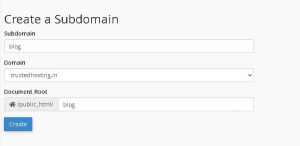
NOTE: These following names are reserved and shouldn’t be used when creating subdomains:
Get 50% Discount On Your First On Any Hosting Plans
Originally published on WebyStrata.com Blog.
Written By
WebyStrata Editorial Team
Shaik Sai Meera shares practical publishing insights, comparisons, and WordPress-focused growth guidance for modern web teams.
Related Articles

How to Set WordPress to Ignore File Path Using .htaccess WordPress is designed to handle website URLs through…
June 19, 2026
How to Setup and Install WordPress Postie Plugin Managing content efficiently is important for any WordPress website. If…
June 19, 2026
How to Change the Language for WordPress WordPress is one of the most popular content management systems in…
June 19, 2026