WHMCS
How to Migrate from Universal Analytics to Google Analytics 4
How to Migrate from Universal Analytics to Google Analytics 4 Introduction Google® will discontinue their Universal Analytics service on July 1, 2023. If you're using Google Analytics™ to track visitors and conversions on WHMCS, you must…

How to Migrate from Universal Analytics to Google Analytics 4
Introduction
Google® will discontinue their Universal Analytics service on July 1, 2023. If you’re using Google Analytics™ to track visitors and conversions on WHMCS, you must move to Google Analytics 4 in the Google Analytics Addon Module before this date.
Migration Process
To move to Google Analytics 4:
1. Log in to the WHMCS Admin Area.
2. Go to Configuration > System Settings > Addon Modules.
3. Click Configure for Google Analytics:

4. Select Google Analytics 4 for Analytics Version.
5. Enter your Google Analytics 4 Measurement ID (in the format G-XXXXXXXXXX) for Measurement ID. You can find this in your Google Analytics account.
This will replace the previous Universal Analytics Tracking ID (in the format UA-XXXXXXXX-X).
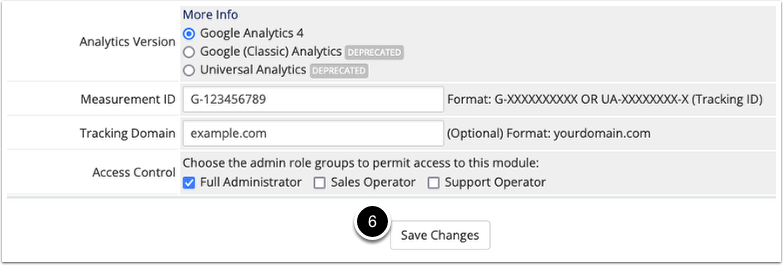
6. Click Save Changes.
Data from WHMCS will now begin to appear under your Google Analytics 4 property.
For more information, see Google’s Help Center resources.
Originally published on WebyStrata.com Blog.
Related Articles